A walkie-talkie for your parking team: press, speak, done
The most expensive thing in a car park is time. Someone at the gate shouts towards the booth; the person in the booth walks down; a third calls on the phone and nobody picks up because their hands are on a car. A three-second job should take three seconds — hold the button, speak, let go, and your voice plays on every teammate's phone. No separate radio, no licence fee, no channel number, no range to worry about: the phone already in their pocket is enough.
It starts switched off, and goes on with the shift
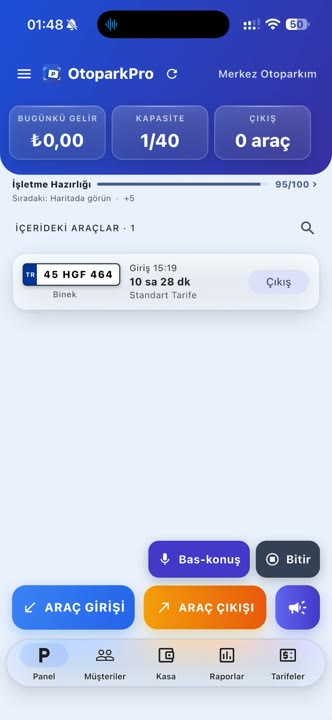
The walkie-talkie is off by default. At the start of a shift you tap Settings → Walkie-talkie → Start; a push-to-talk button appears on the panel and a notification shows that it is on. At the end of the shift you tap Stop and the notification disappears.
Switching it on by hand is a deliberate choice. While it is on, the phone stays awake enough to play incoming announcements with the app in the background; while it is off, nothing runs in the background at all. So the answer to "is it always listening, will it drain my battery" is in your hands: it listens for as long as you leave it on.
Press, speak, release
It records while you hold the button and sends when you let go. Announcements are capped at 15 seconds — nobody talks for fifteen seconds on a radio, and long presses happen by accident. You never hold the phone to your ear: incoming sound plays through the speaker so your hands stay on the car.
Who hears it?
Announcements reach only phones that belong to the same business. There are no passwords, channel numbers or device pairing: add someone to the team and they are on the radio; remove them and they are off it. Another car park's team can never hear you.
If you run several branches, note this: the walkie-talkie works across the whole business, so every phone that has it switched on will hear the announcement. In small teams that is exactly what you want; if you would rather branches did not hear each other, leave it switched off at that branch.
With the app in the background and the screen locked
A radio is only useful if the announcement also reaches the person who is not looking at the app. On iPhone, the system's own push-to-talk interface appears while the walkie-talkie is on and incoming audio plays with the app in the background. On Android a persistent notification stays in the shade; that notification is what tells the phone not to put the app to sleep, so sound arrives even with the screen locked.
It is also heard when the phone is on silent: announcements play through the media channel, not the ringer, so silencing the ringtone does not silence the radio. Volume is adjusted with the phone's own side buttons.
When is the microphone used?
Only while you hold the button and the app is in the foreground. The microphone is never touched in the background; the only thing the radio does there is play what comes in. That is also what the app's store declaration says.
Are announcements stored?
No. An announcement is written to a temporary file on the receiving phone, played, and deleted. No audio is kept on the server and there is no archive to listen back to. The walkie-talkie is a way to talk, not a recording system.
Internet and data
The walkie-talkie works over the internet, on Wi-Fi or mobile data. There is no range limit — the person at the gate and the one at the far end of the car park hear each other equally. Data use is small: audio only travels when somebody speaks, and one announcement is a few tens of kilobytes. If the connection drops and comes back, the radio reconnects on its own.
Without a connection an announcement cannot be sent; this is where the radio differs from vehicle entry and exit, which keep working offline. A parking record can wait for the network, an announcement has to reach the other person now.
Is there an extra charge?
No. The walkie-talkie is included in your OtoparkPro subscription; there is no add-on, no per-user fee and no separate package. Everyone you add to the team can use it. Beyond the app's own subscription, the only thing you spend is the few tens of kilobytes of mobile data an announcement uses.
What does it change?
Three things, in practice: the person at the gate no longer walks over to say "putting it in bay three"; the one at the till presses instead of shouting "there's a car leaving"; and if you offer valet, the runner fetching a car and the person at the door stop waiting on each other. Used together with valet management, the request list shows who is doing what and the radio carries the half-sentences in between.