Valet management in a car park: from request to handover
The hard part of valet is not fetching the car — it is that everyone knows at the same time who is fetching it. When two attendants walk to the same vehicle, what you lose is not time but trust: the customer waits at the door while the team asks each other. This page walks through the valet flow in OtoparkPro end to end: how a request appears, who claims it, where the fee lands and what the report actually measures.
Valet starts switched off
Most car parks do not offer valet, so the feature is off by default, and while it is off nothing valet-related is drawn anywhere in the app — no empty box, no "no valet" line. You turn it on under Settings → Valet.
Once on you see two switches. The first is the service itself; the second, let customers request their car, adds a "Bring my car" button to the QR page. Turn it off and only your team can open requests.
How a request appears
Two ways: the customer asks from the QR page, or the attendant in the booth taps Bring the car on the panel. That second route matters — expecting a customer standing at the door to scan a code is needless friction. The person in the booth stays with the customer and calls the team instead.
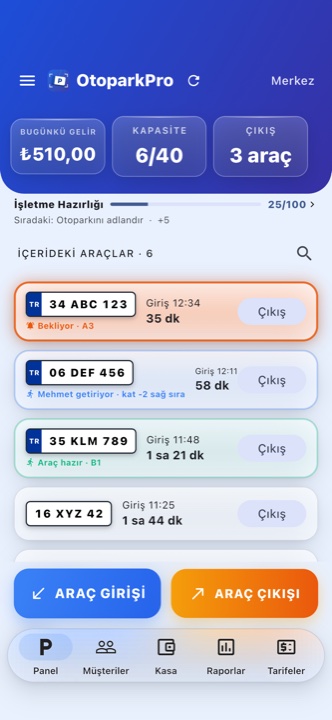 Three states on one screen: a waiting request pulses, a claimed job names who took it, a ready car turns green.
Two people never walk to the same car
Whoever taps I've got this first wins, and the server decides — not whoever has the faster connection. The other person sees no error, just "Ahmet took it", and moves on to another car. The difference looks small but decides behaviour: an error message makes people tap the same button again, while information sends them somewhere useful.
When the car reaches the handover point, tap Mark as ready and the customer sees it on their own phone. If the shift ends, Release hands the request back to the team — and you can only release work you claimed yourself, never take someone else's.
The parking spot note
When the car is parked you can note where it went: "A3", "level -2, right row". It is free text and never required — most car parks have no numbered bays, and making it mandatory would add a step to every single entry. When it is filled in, it shows on the panel and on the vehicle card, so whoever fetches the car knows where to go.
The valet fee: mixed operations
Some car parks offer both self-parking and valet. That is what Settings → Valet → Valet fee is for. Leave it at 0 and valet is free or already inside your tariff, and no extra question appears anywhere — neither a pure valet operation nor one that gives valet away for free sees a single additional step.
Set it above 0 and a Valet service checkbox appears at vehicle entry. For cars you tick, the fee is added at exit as its own line on top of the parking fee, and staff can switch it off when needed. Folding it silently into the total would leave the attendant with no answer when the customer asks why the amount is what it is.
Two rules matter here:
- Discounts never apply to the valet fee. A customer discount belongs to the parking charge; valet is a separate service.
- Subscribers pay it too. A subscription covers parking. If a subscriber hands the car to valet, that service is charged separately — even when the parking fee itself is 0.
Forgot at entry? Add it later
An attendant can forget to tick valet on the way in. Open the vehicle card and turn on the Valet service switch; the fee is added automatically at exit. Ticked it by mistake? Turn the same switch off.
The same can be done at the moment of payment: ticking the valet line on the exit screen both adds it to the amount and marks the record as valet, so the till and the report never contradict each other.
Once the car has checked out, the record becomes read-only — so it can never disagree with money that was already collected.
What the report measures
The valet performance report answers three questions at once: how many cars were brought, how long it took on average, and what it earned. The per-attendant breakdown sits on the same screen.
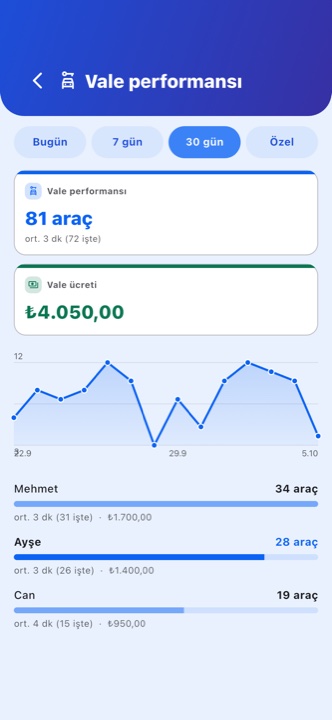 Valet performance: count, average time, revenue and who brought how many.
Three details keep those numbers honest:
- Revenue is what was actually charged. Multiplying the configured fee by the count would have counted money the attendant switched off at exit — money the customer never paid.
- The average states how many jobs it rests on. "Mark as ready" is an optional step, so jobs without a measurable duration count toward the total but not the average. The screen says "avg 3 min (of 72)" to name the set it measured.
- Unclaimed work does not disappear. A car charged a valet fee at exit that nobody claimed appears under Unclaimed. Hiding it would mean nobody could ever ask why a valet fee was taken with no one behind it.
What happens without a connection
The spot note and the valet service flag are written offline too and go to the cloud when the connection returns. Claiming is different: it is a race and the server picks the winner, so it needs a connection. Offline the button does not work and the screen says so — rather than quietly saying "done" and then sending two people to the same car.
Who sees what
Valet requests are visible to the whole team; that is the point of the feature. The valet performance report lives under Reports: the owner and the branch manager see it, an attendant does not.
On the customer side they only ever see their own car: the QR page shows the state and, when one is defined, the valet fee. The parking spot note is never sent to the customer — that information belongs to your team.