Valet parking software: what a valet operation actually needs
Valet software is not a parking product with an extra button. A car park sells space; a valet operation sells a car coming back. That difference decides everything: who holds the key, who knows where the car is, who is walking to it right now, and whether the customer is standing at the door wondering if anyone heard them. This page sets out what a valet operation genuinely needs from software, and how OtoparkPro answers each point — including where it stops.
The paper ticket is the problem; the radio is the symptom
Almost every valet operation runs on two things: a numbered paper stub and a voice on a radio. Both work until the entrance gets busy. Then the stub goes into a coat pocket and comes back out at the wrong moment, two attendants answer the same call, and the person who knows where car 47 is parked went on break.
A valet parking app is worth having only if it removes those two dependencies — not if it adds a screen on top of them. In practice that means the record has to live somewhere every attendant can see, and a request has to have an owner, not an audience.
Opening the record: plate, not a stub number
In OtoparkPro a job starts from the vehicle itself. Point the camera at the plate and it is read on the device — the photo is not sent anywhere to be recognised — or type it in if that is quicker. The record opens on the plate, so the car is findable by the thing the customer and the attendant both already know.
Where the car went is a free-text note: "A3", "level -2, right row". It is never required. Most sites have no numbered bays, and a mandatory field would add a step to every single arrival to buy certainty on a minority of them.
The request: before the customer reaches the desk
When a car checks in, a QR code unique to that record is created. The customer scans it once — no app to install, no sign-up — and from that page they can tap Bring my car. They can do it from the restaurant table or the hotel lobby, which is the point: the walk to the valet desk and the wait at the valet desk stop being the same thing.
The attendant at the booth can open the same request from the panel. That route matters just as much. A customer already standing in front of you should not be asked to scan anything.
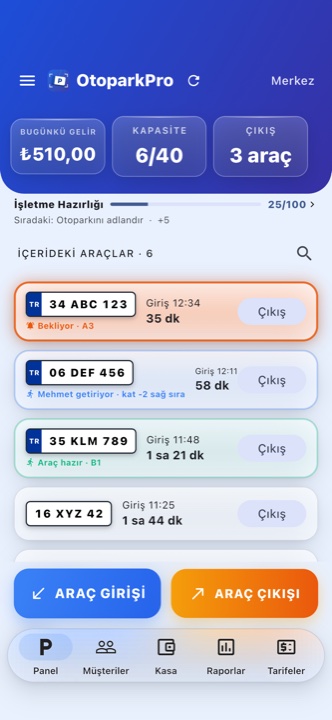 Three states on one screen: waiting, claimed by a named attendant, and ready.
The claim: two attendants, one car
Whoever taps I've got this first takes the job, and the server decides — not whoever has the better signal. The second attendant does not get an error; they get "Ahmet took it" and move on. That distinction changes behaviour on the floor: an error makes people press again, information sends them to another car.
If a shift ends mid-job, Release hands the request back to the team. You can only release work you claimed yourself.
The handover, and what the customer sees
When the car reaches the handover point the attendant marks it ready, and the customer sees that on their own phone — on the same QR page, with no notification app in between. If they want, they can add a card to Apple Wallet or allow browser notifications instead of keeping the page open.
Where the money goes
A valet fee that lives in someone's head is a valet fee you lose. In OtoparkPro it is a setting: leave it at 0 and nothing changes anywhere — valet is free, or already inside your tariff. Set it above 0 and a Valet service tick appears at entry; at exit the fee is added as its own line on top of the parking charge, so an attendant asked "why this amount?" has an answer on the screen.
Two rules are deliberate: discounts apply to parking and not to the valet fee, and subscribers pay it too — a subscription covers parking, not a service performed by a person.
Payment can be taken at handover without a terminal: the customer scans the QR code and pays from their own phone, and the exit completes by itself the moment the payment lands. Money goes directly to your own Stripe or PayTR account.
What the report has to measure
Valet reporting is not "how many cars". It is who, how fast, and how much. OtoparkPro reports valet jobs per attendant with the average time from request to handover, and the valet revenue that came with them. Collections are tracked per staff member, and the end-of-day summary can be shared over WhatsApp or SMS with an evening reminder.
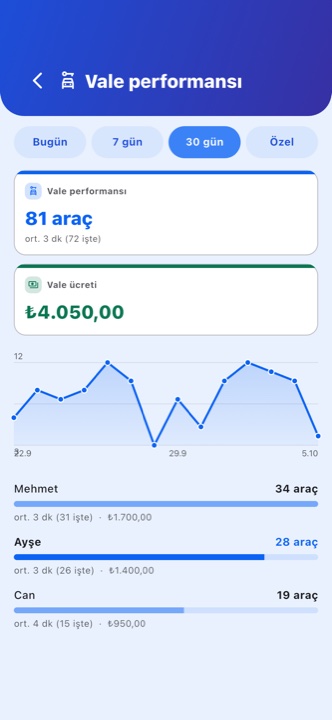 Per attendant: jobs handled, average minutes, and the revenue attached.
What breaks when the signal does
Underground levels and steel-framed car parks lose signal, and that is exactly where valet happens. OtoparkPro keeps working offline and syncs when the connection returns; plate reading runs on the device, so it does not depend on the network at all. The one thing that genuinely needs a connection is the claim, because deciding who owns a job is the thing that must never be decided twice.
Six questions worth asking any valet software
- Can the customer request the car before reaching the desk? If not, you have digitised the stub and kept the queue.
- What happens when two attendants tap at the same time? If the answer is "the faster phone wins", it will go wrong on your busiest evening.
- Can an attendant hand a job back? Shifts end mid-job; software that cannot express that pushes the work back onto the radio.
- Is the valet fee a separate line? Folded into a total, it stops being explainable, and then it stops being charged.
- Does it work with no signal? Ask specifically about the lower levels.
- Can several people use it at once, on their own phones? Per-seat pricing turns that into a budget question instead of an operational one.
On the last point, OtoparkPro is one subscription for the business: staff are added with an invite code, every device shares the same live picture, and there is no per-user fee. Critical actions can be protected with a manager PIN, and each record keeps who handled it and what was corrected.
Where this fits
Hotels. The guest asks for the car from the room or the lobby, so the wait happens upstairs rather than at the door. Long stays and repeat guests sit in the vehicle history.
Restaurants. The request comes from the table while the bill is being settled, which is the difference between a car waiting for the guest and a guest waiting for the car.
Shopping centres. High turnover and shift changes; per-attendant reporting is what makes the shift legible afterwards.
Hospitals. Arrivals are unpredictable and often urgent; a plate-based record and a spot note matter more than tidy bay numbers.
Events. A short, dense peak. Several attendants on their own phones with no per-seat cost, and a board on a TV showing the live state.
Private car parks and valet companies. Mixed operations — some cars self-park, some are handed over. The valet fee switch exists for exactly that: one site, both models, one till.
Where it stops
OtoparkPro is a phone-first system. It does not drive barriers, key cabinets or ticket printers, and it is not a chauffeur or vehicle-logistics product. If your operation depends on hardware integration, this is the wrong tool and it is better to know that now.
For the step-by-step mechanics of the valet flow — switches, claiming, releasing, the fee at exit — see valet management in a car park. For the wider parking side, see parking management software and the OtoparkPro product page.