How are booking clashes prevented?
Two teams can't be booked on the same court at the same time. This page covers the clash rule, what happens when two phones take a booking at the same moment, how fixed matches behave when the slot is taken, and customer requests.
The rule in one sentence
On one court, on one day, there can't be two active bookings whose time ranges overlap. Active = booked, on court or closed; a cancellation or "no-show" frees the slot. Overlap is checked to the minute: with a 20:00–21:30 match in place, a 60-minute booking starting at 21:00 clashes, one starting at 21:30 doesn't.
On the schedule screen
Tapping a taken cell on the grid opens that booking's card, not a new booking — you can't overwrite it by accident. A new booking can only be opened from an empty cell. If the duration you pick when opening it (60 → 90 → 120 minutes) runs into the next taken slot, the save is rejected; free that slot first.
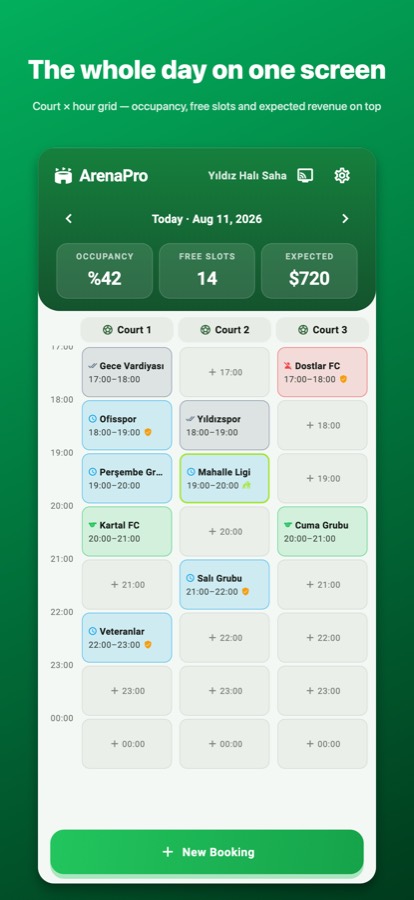
Two phones at the same moment
If you and your partner try to take the same slot at the same moment, a second check runs at the instant of saving. The one who's late sees the warning "This slot was just taken — check the schedule." and the booking isn't saved. If the devices are connected to the cloud, the schedule syncs within a few seconds. If both devices took the same slot while offline, both land on the schedule once the connection is back — the app doesn't pick one; you see both and cancel one by hand. That's why you should keep the phones online when working with a partner.
When a fixed match lands on a taken slot
When a fixed match generates its weekly bookings and that slot is already taken by another record that week, that week is skipped; the existing record isn't overwritten and you aren't notified — if the week the team didn't come was sold to someone else, that's a deliberate choice. If you want to move a fixed match to a new time, first check that the new time is free in the coming weeks.
Customer requests
A request that comes in through the customer link is not a booking; it waits for approval at the top of the schedule screen and doesn't hold the slot. If the slot has been taken by the time you approve, the app still applies the clash rule and warns you. So don't leave requests waiting; approve or decline them.
Common mistakes
- Cancelling instead of marking "No-show" and then trying to sell the slot: both free the slot, but only "No-show" goes on the record.
- Assuming a closed match is still "taken" and not opening the next slot: closing doesn't free the slot, the duration simply ends; the next slot is already free.
- Entering a long match as two separate bookings: set the duration to 120 minutes in a single booking; the price scales proportionally.