How do I set up fixed (weekly recurring) matches?
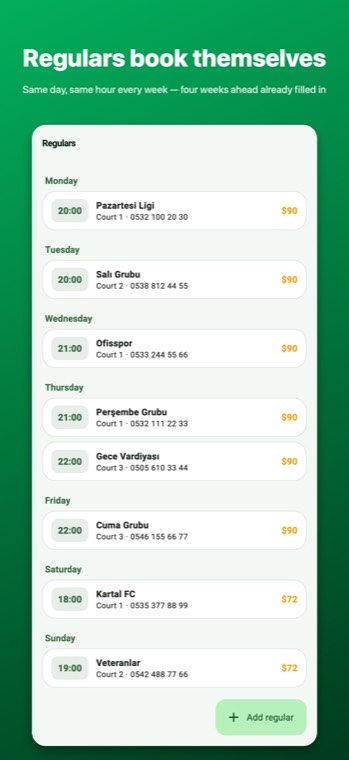
You say "every Tuesday at 21:00, the Veterans"; the schedule fills itself four weeks ahead. This page covers creating a fixed match, freeing up a single week, monthly dues and stopping a fixed match.
What is a fixed match?
It's the record of a team that comes on the same day and time every week. You define it once; the app writes the next 4 weeks of bookings into the schedule itself and tops up the missing week every time it opens. The team keeps its spot without you having to open bookings one by one.
Creating a fixed match
- Switch to the Fixed Matches tab in the bottom bar and tap Add fixed match.
- Choose the court, day, time and duration.
- Enter the team name and phone number — the phone number links the team's history (deposits, no-shows) with its other bookings.
- Agreed price: if you've agreed a set price with the team, enter it; if you leave it blank, that day's price rule is applied every week (see Courts and pricing).
- Monthly dues (optional): if the team pays per month, enter the amount; explained below.
- Save. On the schedule screen, that day and time shows as taken under the team's name for four weeks.
Not coming this week: freeing up a single week
If the team says "we're out this Tuesday", open that week's booking on the schedule screen and Cancel it. Only that week is freed; the fixed match stays intact and the following weeks stand. The freed slot shows as "available" on the customer link and the TV board — you can sell it to another team.
Teams on dues
Some teams pay per month rather than per match. If you entered monthly dues on the fixed match, the Fixed Matches list shows this month's status next to each team: a team that hasn't paid is red, one that has shows "Paid this month". Tap Collect dues and choose cash/card/bank transfer; the amount goes into that day's till. Dues appear as a separate income line in the day-end till. The weekly matches still sit on the schedule with their price; if the team pays by dues rather than per match, enter 0 as the amount collected when closing the match — an amount below the calculated one asks for the manager PIN if one is set, and is written to the audit log either way.
Changing and stopping
- To change the time, court, price or phone number, tap the team and edit. The change applies to future weeks; past records stay as they are.
- Stop: no new bookings are opened for future weeks; ones already opened stay on the schedule and can be cancelled by hand if needed. Use this when the team says "we're done".
Common mistakes
- Stopping the fixed match when the team doesn't show up: cancel just that week and let the fixed match stand.
- Entering the same team under two different phone numbers: the history gets split in two; use a single number.
- Entering an agreed price, then changing the price rule and asking "why didn't it change": the agreed price overrides the rule, by design.