Taking a deposit and marking a no-show
A deposit shifts the risk of a wasted slot onto the customer; the "no-show" mark keeps a record. This page covers deposits, remote bank transfers, the remaining amount at close, and how a no-show team triggers a warning next time.
The life cycle of a booking
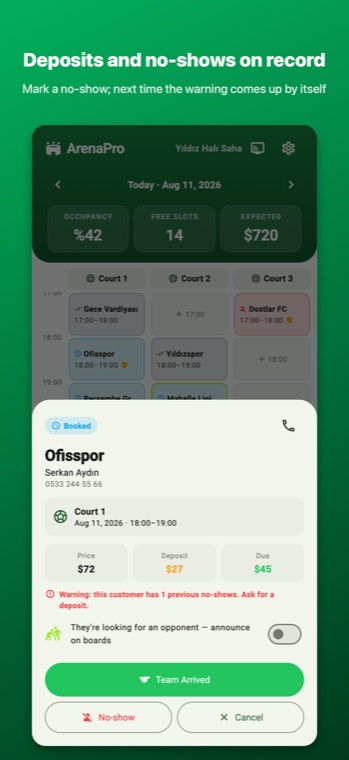
On the schedule screen, you tap an empty cell and open a booking: time, duration, team name, phone number and price. Depending on its status, buttons appear at the bottom of the card:
- Take Deposit — before match day (on a future-dated booking this is the only option; closing becomes available on match day).
- Team Arrived — when match time comes; the card turns the "on court" colour.
- Close and Collect — when the match is over, collect the remaining amount and the card closes.
- No-show — if the team didn't turn up; it goes on their record.
- Cancel — the slot becomes available again and the record is kept as "cancelled".
Taking a deposit
- Tap Take Deposit on the booking card.
- Enter the amount and choose the method: cash, card or bank transfer.
- Confirm. The deposit is written to the till on the day it's taken — not on match day. That way your till balances with the money that came in that day.
The card now shows "Deposit: X" and "Remaining: price − X". At close, the app suggests only the remaining amount.
Closing: collecting the remainder
When you tap Close and Collect, the closing screen opens: "X was taken as a deposit; the amount below is the remainder." You confirm the suggested amount or change it. Any items put on the canteen tab are added to the remaining amount (see Canteen and barcodes). Warnings:
- "… you are collecting less" — the amount you entered is below the remainder. If that's intentional, carry on; an amount below the calculated one asks for the manager PIN if one is set, and is written to the audit log.
- "… you are collecting MORE" — the amount you entered is above the remainder. Usually the deposit was recorded twice; fix the extra entry in the payments list.
- "This is the FULL price — a deposit was already taken" — you entered the full price but there was a deposit; the remainder is different.
No-show team
If the team didn't turn up, tap No-show on the card. The confirmation dialog tells you what will happen: if a deposit was taken, "the deposit stays in the till; the booking is marked as 'no-show' and appears on the customer's record". The deposit is forfeited — you don't refund it; it was already counted in the till under "Deposits collected" on the day it was taken.
Next time a booking is opened with the same phone number, the app warns you: "Warning: this customer has failed to show up N times before. Don't take a booking without a deposit." The record is tied to the phone number, so enter the number the same way on every booking.
If you tapped "Team Arrived" by mistake, Undo (count as not arrived) takes you back to the booked state. "No-show" and "Cancel" are final; if either was a mistake, open a new booking.
Common mistakes
- Writing the deposit to the till "again" on match day: the deposit is in the till on the day it was taken; at close, collect only the remainder.
- Closing a no-show team with "Cancel": it doesn't go on the record, and no warning appears next time. If they didn't turn up, use "No-show".
- Entering the phone number in different formats (0532… / +90532…): the app normalises the number, but a typo splits the record.