How do I set up courts and hourly pricing?
The rows of the schedule grid are your courts; the prices come from price rules. This page covers courts, slot length, the base price and day/time-based price rules.
What happens on first setup?
When you open the app for the first time, it asks three questions: venue type (five-a-side pitch, padel, tennis, basketball, futsal…), number of courts and hourly price. Your courts are seeded from those answers and your schedule screen is ready in a minute. You can change all of it later; this page explains how.
Where are the courts?
Settings → Business → Courts. Only the business owner and managers can edit; staff can see them but not change them. Each court has four fields:
- Court name — the name shown on the schedule and the TV board ("Court 1", "Indoor Court" and so on).
- Slot — the standard length of a booking. 60 minutes is common for five-a-side, 90 minutes for padel and tennis. You can still change the duration when opening a booking; the slot sets the default.
- Base slot price — the price that applies when no price rule matches.
- Indoor (covered) — an informational flag; it helps customers tell courts apart on the booking link.
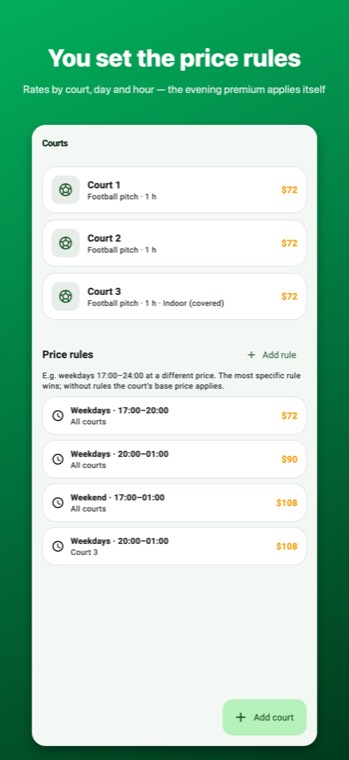
Price rules: day × time band
The same court costs one price on weekday daytimes and another in the evening and at the weekend. You define this with Price rules; each rule has four parts:
- Scope: all courts or a single court.
- Days: every day, weekdays or weekend.
- Start–end time: the time band the rule applies to (e.g. 17:00–24:00).
- Slot price: the price of one standard slot in that band.
When a booking is opened, the app looks at the day and time, picks the matching rule and fills in the price for you. The rule price is for a standard slot; other durations scale proportionally (with a 60-minute slot, a 90-minute match pays 1.5 slots). If more than one rule matches, the most specific one wins: a rule written for a single court beats an "all courts" rule, and a narrow time band beats a wide one. If no rule matches, the court's base price applies.
Reading it with an example
Say the base price is 1,200 and the rules are weekdays 17:00–24:00 → 1,500 and weekend all day → 1,800.
- Tuesday 15:00 booking: no rule matches → 1,200 (base).
- Tuesday 21:00: weekday evening rule → 1,500.
- Saturday 11:00: weekend rule → 1,800.
Pricing for fixed matches
If you enter an "agreed price" on a fixed match, that price applies; if you leave it blank, that day's price rule is applied every week. Details: Fixed matches.
Common mistakes
- Writing the rule for one court and forgetting the others: set the scope to "all courts".
- Assuming the time band includes its end time: a 17:00–24:00 rule covers a match starting at 23:00, but not one starting at 24:00.
- Leaving the base price at zero: at hours no rule covers, bookings open at 0.